
Why WordPress Is Still the Best CMS
Why WordPress Is Still the Best CMS
In a world full of website builders, SaaS platforms, and flashy design tools, WordPress continues to lead the way as the most popular content management system (CMS) globally. Powering more than 43% of all websites on the internet, WordPress remains the go-to choice for everyone from small businesses to global corporations, bloggers to eCommerce entrepreneurs.
But what exactly makes WordPress stand out after all these years? Why do millions of people continue to rely on it for their websites?
This article breaks it down step-by-step, using practical examples and real-world applications to show you why WordPress is still the best CMS for most users.
It’s 100% Free, Open-Source, and Beginner-Friendly
Free Software for Everyone
One of the biggest reasons WordPress dominates the market is its free, open-source nature. You don’t pay anything to download, install, or use WordPress. Whether you’re an individual blogger or a growing business, you can start your website without paying licensing fees.
Benefits of Open-Source:
No monthly or annual software costs.
Full control over your website files and data.
Ability to modify and customize however you like.
A massive community of developers continuously improving the platform.
Designed for Beginners
WordPress offers a simple, clean dashboard with a gentle learning curve.
One-click installation with most hosting services.
Block editor (Gutenberg) makes designing pages easy without coding.
Tons of step-by-step tutorials and beginner guides available online.
Example:
A freelance designer started her personal portfolio using WordPress without any prior coding knowledge. She used a free theme and a simple page builder plugin, saving hundreds of dollars in design fees.
With WordPress, anyone can create a professional website, no matter their technical skill level.
Unmatched Customization with 10,000+ Themes and Plugins
Build Any Website You Want
No other CMS offers the same level of flexibility and customization as WordPress. Thanks to its huge library of themes and plugins, you can build any type of website:
- Blogs
- Online stores
- Portfolios
- Membership sites
- Booking platforms
- Directories
Themes for Every Style
Thousands of free themes in the WordPress directory.
Responsive and mobile-friendly designs.
Easy customization with built-in tools or page builders like Elementor.
Premium themes with advanced features available on marketplaces like ThemeForest.
Plugins That Extend Functionality
WooCommerce turns WordPress into a full eCommerce store.
Yoast SEO helps improve search rankings.
WPForms creates beautiful contact forms.
MemberPress for creating subscription-based websites.
LearnDash for building online courses.
With over 60,000 plugins available, WordPress adapts to whatever project you have in mind.
Example:
A local gym used WordPress to build a site with class schedules, online booking, and membership payments, all handled through free and premium plugins—saving them thousands in custom development costs.
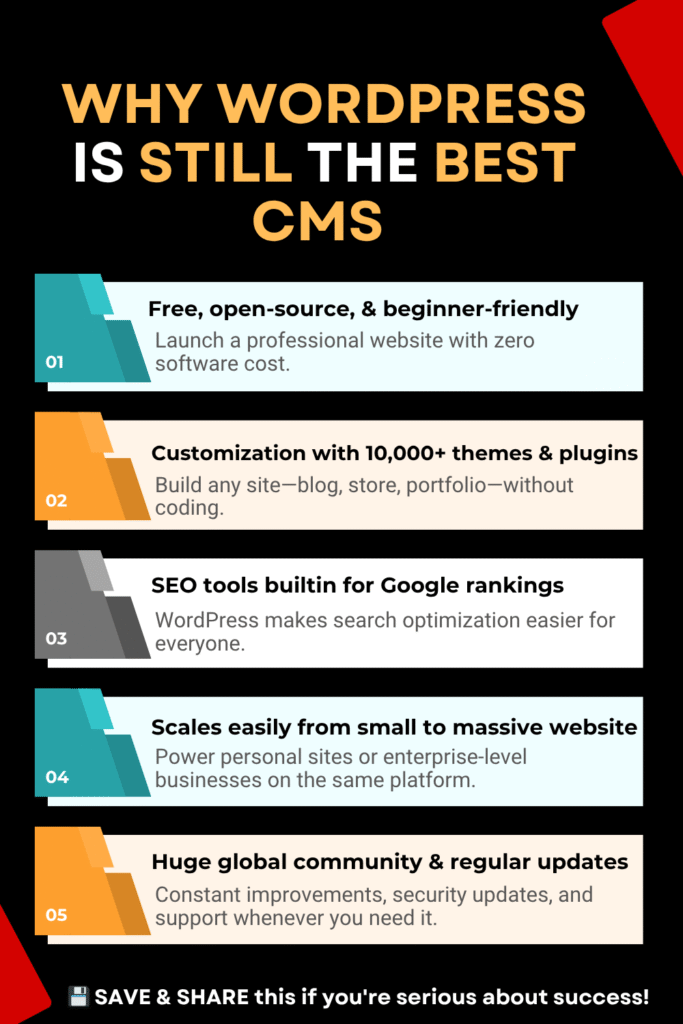
SEO Tools Built In for Better Google Rankings
Get Found on Google Faster
Search Engine Optimization (SEO) is essential for online success. WordPress gives you a solid head start with its SEO-friendly structure:
Clean permalink options.
Mobile responsiveness by default.
Optimized HTML markup.
Fast loading potential with proper setup.
SEO Plugins Make It Even Better
Yoast SEO offers on-page SEO tips and automatic XML sitemap generation.
Rank Math is a popular alternative with even more advanced options.
Integration with Google Analytics and Google Search Console is quick and easy.
Example:
A food blogger switched from a basic free platform to WordPress and used Yoast SEO to structure content properly. Within three months, organic traffic doubled.
WordPress provides all the tools you need to appear on Google’s first page—if you use them properly.
Scales Easily from Small Blogs to Massive Websites
Start Small, Scale Big
Many website builders are great for getting started but can’t scale with your business. WordPress, however, grows with you.
Start with basic shared hosting.
Move to VPS or cloud hosting as your traffic grows.
Handle millions of monthly visitors with proper optimization.
Flexible for Any Business Size
Run a personal blog with just a few posts.
Manage an online store with thousands of products.
Build a corporate website with complex service pages and features.
Host forums, learning management systems, and membership sites.
Enterprise-Level WordPress Sites:
TechCrunch, The Walt Disney Company, and BBC America all use WordPress to serve millions of users monthly.
Example:
A digital marketing agency started with a simple blog on WordPress. As they expanded services, they added portfolio pages, lead capture forms, and a members-only training portal—all on the same WordPress installation.
Huge Global Community and Regular Updates
Community Means Stability
One reason WordPress continues to thrive is its active global community of users, developers, and contributors.
Thousands of free tutorials, YouTube videos, and blogs.
Community forums provide free support.
Local WordPress meetups and international WordCamps encourage collaboration.
Continual updates keep WordPress secure and modern.
Frequent Security and Feature Updates
Major updates happen several times per year.
Regular security patches keep your site safe.
New features are added based on community feedback.
Plugins and themes are constantly improved by third-party developers.
Example:
A small nonprofit avoided expensive agency fees by learning through WordPress community forums. They built their own website and maintained it by following update announcements and plugin changelogs.
With WordPress, you’re never building your site alone.
Final Thoughts: Pair WordPress with Reliable Hosting for Best Results
WordPress alone is powerful, but pairing it with the right hosting provider ensures you get speed, security, and scalability to match your goals.
If you’re looking for cloud-based performance with managed WordPress support, Cloudways is an excellent choice. They offer fast servers, automated backups, free SSL, and 24/7 expert support without needing to manage server details yourself.
Another reliable option is SiteGround, well-known for beginner-friendly WordPress features, proactive security, and excellent customer service.
Choose your CMS (WordPress) wisely—and back it up with a solid hosting provider—and your website will be set up for long-term success.